ODOO14 批次列印QR碼
-
-
### 連續產生QR碼並直接列印至印表機
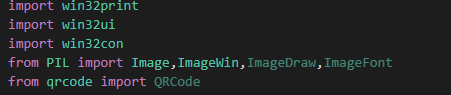
import win32print
import win32ui
import win32con
import qrcode
import odoorpc
from PIL import Image,ImageWin

db_ip = '192.168.122.X'
db_name = 'test'
user_name = ''
user_password = ''

# Prepare the connection to the server
odoo = odoorpc.ODOO(db_ip, port=8069)
# Login
odoo.login(db_name,user_name,user_password)
Wt = odoo.env['workticket.wt']
wt_ids = Wt.search([('wt_status', '=', 'Y')])
for wt in Wt.browse(wt_ids):
    if wt.wk_status == 'N' :
        total_prt = wt.total_prt + 1
        part_descp = wt.parts.part_descp
        pack_qty = format(int(wt.pack_qty), '.3f')  ##顯示小數點下三位
        NQRCode = wt.name+'_'+wt.style+'_'+part_descp+'_'+wt.color+'_'+wt.size+'_'+wt.materiel+'_'+str(pack_qty)+'_'+str(total_prt)
        qr = qrcode.QRCode(
            version=3,
            error_correction=qrcode.constants.ERROR_CORRECT_L,
            box_size=100,
            border=4,
        )
        qr.make(fit=True)
        qr.add_data(NQRCode)
        img = qr.make_image(fill_color="black", back_color="white")
        printer_name = win32print.GetDefaultPrinter ()
        hDC = win32ui.CreateDC ()
        hDC.CreatePrinterDC (printer_name)
        hDC.StartDoc ('QR')
        hDC.StartPage ()
        dib = ImageWin.Dib (img)
        # 第一行
        x1 = 15
        y1 = 5
        x2 = 485
        y2 = 50
        # 圖片
        x11 = 305
        y11 = 50
        x12 = 485
        y12 = 230
        font = win32ui.CreateFont({
            "name": "Arial",
            # "underline": True, 底線
            "height": 42,
            "weight": 42,
        })
        show = wt.style
        hDC.SelectObject(font)
        hDC.DrawText (show,(x1,y1,x2,y2), win32con.DT_LEFT)

        dib.draw (hDC.GetHandleOutput (),(x11,y11,x12,y12))

        hDC.EndPage ()
        hDC.EndDoc ()
        hDC.DeleteDC ()
直接寫成一個PY檔能確實執行
但是把同樣程式寫入odoo內
列印卻出現空白
Hello! It looks like you're interested in this conversation, but you don't have an account yet.
Getting fed up of having to scroll through the same posts each visit? When you register for an account, you'll always come back to exactly where you were before, and choose to be notified of new replies (either via email, or push notification). You'll also be able to save bookmarks and upvote posts to show your appreciation to other community members.
With your input, this post could be even better 💗
Register Login